BLOGGER TEMPLATES AND TWITTER BACKGROUNDS »

Tuesday, December 10, 2013

New Kids on the Block

My first big boy band crush, like most girls my age, was New Kids on the Block. To this day, there has not been another singer or group that I ever loved as much as I loved (OK, worshiped) NKOTB. I owned everything and anything they made and distributed as merchandise. Bed set (pillowcases, sheets, comforter), trading cards, dolls - both plastic and fabric, clothing, posters, cassettes, VHS tapes, books, magazines, jewelry, buttons... oh, the amount of money my parents must have spent!

Oh, memories! I know I owned that same hat and most of this other stuff.
Image from acommonsea.wordpress.com.
My favorite NKOTB was Joey and I never wavered from my devotion to him throughout my adoration of the group. My best friend at the time was a huge Danny fan so luckily we didn't feel like we were in competition with each other.

New Kids on the Block back in the day.

He was so gorgeous!
I outgrew my NKOTB phase but did get a little happy when I heard they had reunited in 2008 and saw a few of my friends were going to their concerts. For me, it just wouldn't be the same. There was something about being a young girl swooning for a group of teenage boy singers that I just don't think could be recaptured.

Keep hangin' tough!

Trolls

I'm not sure what the obsession was with these little things. The phrase "so ugly it's cute" comes to mind, though. I can remember the fad really picking up around fifth or sixth grade.

Troll Dolls
Image from thisorthat.com
We would all bring our trolls to school and show off the newest one we had either purchased or been gifted. I remember getting a few for Christmas gifts during that time as well. I had one that was dressed as a bunny, I had little ones that fit on the end of my pencils, but my favorite was my larger, stuffed troll doll.

Soft-bodied Troll Dolls
Image from eBay
I collected them until some new fad came along to take its place but these wide-smiled, big-eyed, bare-bottomed little trolls still hold a big place in my heart.

Stay trendy!

P.S. Apparently Dreamworks is planning a movie based on the trolls and the origin of their colorful hair to be released in 2016. Hmmm. May have to see that one!

Saturday, December 7, 2013

Nintendo

Hello again!

Image from memeshare.net
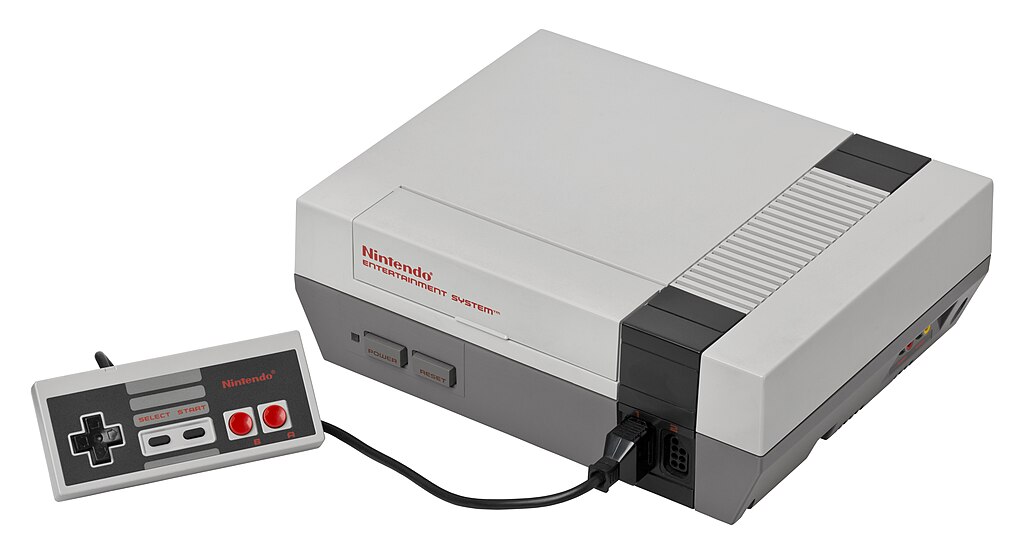
You were not a true 80's kid if you didn't know the biggest "secret" to operating a Nintendo gaming system. Sure, you could just put the game in and hope that you would see something other than an empty screen but you knew that only happened on days where the video game gods were feeling particularly happy (they were mean, nasty SOB's back in those days). Without thinking, you took that game cartridge, turned the open side toward you and blew your pursed lips across it a few times. That worked a lot of the time, for reasons still unknown to this day. If it didn't work, you tried it as many times as you needed to until it did work. This pleased the gods.

Original NES Gaming Console.
I remember getting a Nintendo as a Christmas gift from my parents as a gift to be shared with my younger brother and sister. Before that, we had played some games on a neighbor's Atari but this was light years ahead of that as far as I was concerned. The first game I really remember playing was the original Super Mario Brothers. Our copy also had Duck Hunt and World Class Track Meet on the same cartridge. WCTM worked with the Power Pad which we also got for Christmas. We would shake the shelves in our house, jogging our little hearts out to the finish line with that game.

We had our Nintendo for a long time and eventually upgraded it to a newer version that proved to be slightly less buggy. I kind of miss it. I know video games have come a really long way from 8-bit gaming but the excitement of the new technology that Nintendo brought with it is a feeling of nostalgia that I'm glad to say I got to experience.

Keep leveling up!

Punky Brewster

Hi everyone!

I recently found and watched the entire four seasons of my favorite childhood TV show, Punky Brewster. Man, did that bring back some memories! I wanted to be Punky when I was younger. I loved her clothes, I loved how funny and pretty she was. She always seemed to do the right thing too. Well, at least by the end of the episode.


Punky and Brandon.
Image from eonline.com, copyright NBC.
If you've never watched Punky Brewster, you may be wondering what it's all about. It is about a little girl named Penelope "Punky" Brewster (bet you didn't see that one coming) who ends up on her own because her father left years before and her mom left her at a grocery store. Punky (played by Soleil Moon Frye), along with her puppy, Brandon, happen upon an abandoned apartment where they are eventually found by the grumpy building manager, Henry Warnimont (played by George Gaynes). Punky charms her way into Henry's heart and he takes her and Brandon into his home to be a family.

Every episode had some message behind it, told through humor and love. Some issues that are tackled throughout the series include alcoholism, death, and drug use which incorporated the nationwide "Just Say No" campaign into a few different episodes..

My favorite episode of Punky Brewster is actually a series of five episodes called "Changes." In these episodes, Henry becomes very ill and Punky is taken from him as a result. The episodes show Henry's struggle to get his family back, no matter the cost. These are my favorites mostly because they really show the love between Henry and Punky through a lot of ups, downs, and in betweens.

The cast of Punky Brewster.
Image from fanpix.net, copyright NBC.
I wish there were more shows still on like this one, that teach good values with family-friendly humor while still being really entertaining. At least this one is still available for viewing through DVD and other online sources. I highly recommend this show for a nice walk through some of the issues faced by kids and young adults in the mid 80's and how one little girl takes on these problems with her foster father, her dog, her friends, and a little bit of "Punky Power!"

Stay unique!

Thursday, December 5, 2013

Number Munchers

When I was in school, computers were still a brand new thing in a classroom setting. We were using Apple computers and were required to bring in a floppy disk on which to store our work. In elementary school, with computer usage on the rise, we had one class a day that focused on just that subject. Some days we had to type things and we, of course, learned how to navigate around the computer but my favorite days... the best days... were the days we got to take a break from our lessons and play games.

I only remember two games ever really being an option for us at that time, Number Munchers and The Oregon Trail. Number Munchers was an educational game but it never struck me as that because it was so much fun. The object was to make your way around a grid of numbers, "munching" only the numbers that met a certain criteria set for that level.

This screen capture, for example, shows that you can only pick the prime numbers to earn points.
You had to do this while avoiding the monsters, called Troggles. I'm not sure why this game was so much fun but I've always loved math so maybe that was part of the appeal for me. If you want to get nostalgic, you can find an online version of this amazing game through VirtualApple.org which is an amazing site with a lot of games from way back when.

Stay Troggle-free!

Thursday, November 7, 2013

Hello 3D

Hi again, everyone.

This week we were given an assignment in class to make a 3D model with the help of a free program called Catch 123D. I was pretty geeked about this assignment because this was something I had never done but, after looking at the sample images, I knew it could produce some interesting results.

Last week I gave a glimpse into one of my minor obsessions with one of my images from that assignment; Hello Kitty. I probably, in hindsight, should have chosen just one thing for my model but I didn't know any better and went with one of my lunchboxes (I've used them as purses before, actually) and two beanies.

This assignment filled up most of my week as I tried a few other objects (two different I Love Lucy Barbies and a fake plant… I’ll explain why those didn't work later) and had to redo the pictures a few times as well. Thankfully I really love doing stuff like this or I probably would have given up. I read some of the tutorials but this is one of those projects that you don’t know you've done something wrong until it doesn't work. Things I learned that may be helpful to someone else using this program for the first time:
  • Check and double check the settings on your camera. I used my cell phone and I wish I’d had a digital camera for this assignment. The key is consistency. Focus and lighting need to be fixed, don’t use the auto feature for anything. The pictures won’t match up correctly if you do.
  • Make sure you take as many pictures as it recommends, I read 40-70 somewhere. You will need all of them to make the best 3D image.
  • I also read to keep your image between 3 and 5 megapixels and do not crop them. I didn't crop mine but I did have to resize them because they were too big and it slowed things down a lot.
  • Use an object that is solid and doesn't have anything sticking out or hanging off. I tried a fake plant and there were just way too many little things sticking up, the program couldn't pick up on all of that… well, maybe it could have but it’s definitely not something for beginners! One of the I Love Lucy Barbies also had a sheer skirt over pants, that didn't turn out. You’ll also see the handle on the lunchbox didn't turn out right on my final image. I learned from that so I’m not going to beat myself up over it.
  • Lighting, lighting, lighting. I said it before and it’s worth repeating because I think this is the most important thing to ensure your pictures are similar in value. Use an even lighting and make sure you don’t have light glare spots. Again, mine could have been lit better so I learned this the hard way.
  • I read that setting your object on a newspaper is a good idea. I would also recommend putting down other things like Post-Its or dots around your object to help when you need to suggest reference points in the program. The more, the merrier (I used four Post-Its and wish I had used more). Make sure the focus is set to make both the object and background appear clear in your image. The reference points are no good if you can’t see them. Another lesson learned the hard way.
Here is my 3D model:


I made a lot of manual reference points in my image to make sure it stitched as best as I could get it to. If my images were better, I probably wouldn't have had to do so much manual labor. The mesh healing (to fix any holes and get rid of the stuff I didn't want) was probably the easiest part and it looked really sweet too.


I learned a lot more about photography and, of course, 3D image creation this week. I think I’m going to change one of my classes to a photography class next semester because I realized how much I don’t know through doing all of these assignments!

I’m sure I will play around with Catch 123D again. The results (even though I’m not 100% happy with them… I’m a bit of a perfectionist LOL) were really amazing and made me concentrate on a lot of detail work which I kind of enjoyed as only a geek really can. 8-)

Stay focused!

Thursday, October 31, 2013

Art With Words

Hi everyone.

This week for school we were asked to create typographic and text-based art using a few different online programs. I decided to base my work on some of my favorite things; butterflies, Hello Kitty, and I Love Lucy. These programs were really fun to use. They were all pretty straight forward and easy to navigate but also allowed for some customization which I liked and tried to utilize.


Glass Giant has a lot of cool applications available and for this assignment we used the ASCII Art program. ASCII takes random characters and puts them together to form an image. I tried a few different images but ultimately decided on a simple line drawing I found of Hello Kitty. I made the image in white with black text and black with white text and it was interesting to me how the program used different characters for the same drawing.


TEXT-IMAGE.com is another online text-based art program that offers three options for creating an image. I chose a rainbow colored butterfly from freepik for all three to see the differences from one to the next.

The first is HTML which was my favorite of the three. This creates an ASCII type of picture but it can use the color of the image to determine the color of the text print. The best thing was that it lets you choose your own text to form the image. I found a quote about on BrainyQuote that says "What the caterpillar calls the end of the world the master calls a butterfly." (Richard Bach) and I used that for the characters. I also chose a dark purple background since the images in the program stand out better on something dark due to contrast.


The second type of image you can make is with ASCII just like the previous program. For this one, I used the same dark purple background as the HTML image and used white text for contrast.


The third converter available is Matrix which is also an ASCII type of image but this one uses special characters in a bright green color on a black background to look similar to Sci-Fi/Matrix text. It was really easy to use, not much option for customizing due to the specific look of the design.


Tagxedo

Tagxedo is a word cloud image creator. It form an image by taking words and laying them out in such a way as to form a picture with certain words having more emphasis depending on the text source. Unlike the other programs, this one has a save feature which was nice. I saved my image as a 2MP PNG file, although it allows for higher quality if desired.

This was by far my favorite program as it allowed for the most customization and experimentation. I started with an image from my favorite episode of I Love Lucy, "Vitameatavegamin" for the shape. I had to edit the picture to remove background and increase the contrast and change the image to black and white so the program would pick up on the lines of the image that I wanted to bring out. Tagxedo will do this for you but I preferred the control I had using Photo Paint (I also had to draw in a few lines to make parts of the drawing stand out a bit more). I also created my own color palate that used red, purple, pink, and black since that seemed to fit my subject the best. For the text itself, I found an online script of the "Vitameatavegamin" episode and used that to create the word list. I also found a font similar to the one for the I Love Lucy heart logo (Savoye LET Plain) and used that. I removed a few words that I didn't want to use and played with the arrangement of the words a few times to get one I liked. I spent a lot of time on this, trying to make sure my image came out recognizable. I really like the end result and am already thinking of other ways I can use this program to create art to hand around my house.


I hope you enjoyed seeing my work this week!

Keep customizing!